Photo or logo to a clean SVG and DXF.
Trace a photo, logo or drawing into a cut-ready SVG, DXF or transparent PNG at the exact size you need. AI redraw turns busy, shaded images into flat art that traces cleanly.
Tracing runs in your browser · downloads use 1 Hooyah Coin
Vectors that are ready to toolpath
AI redraw
Turns photos, shaded art and busy logos into flat two-tone art that traces cleanly. It keeps the composition and the lettering. Styles: clean line art, bold silhouette, and pen & ink for engraving.
Three trace modes
Fill shapes for solid cut shapes, Outline edges for a line drawing, or Centerlines for single-line engraving paths.
Fine control
Adjust the threshold (or use auto), edge weight, smoothing, speck removal, corners and detail. You can also invert to trace the light areas.
Exact finished size
Set the finished width in mm. SVG and DXF files carry that width, and PNG renders at 150, 300, 600 or 1200 dpi.
See every path
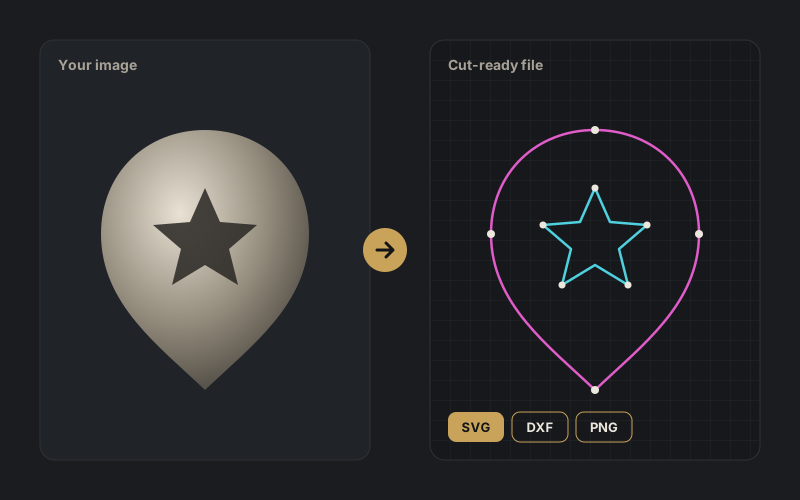
The Trace lines view shows outer paths in magenta and holes in cyan, so you catch problems before you cut.
Clean files
You get closed vectors on a single layer. Drop, paste or link any JPG, PNG, WebP, BMP or GIF.
Opens cleanly where you work
Use it for laser engraving, V-carving, profile cuts, vinyl and stencils.
Trace your first file in under a minute.
Free account with starter coins included. Also try Carve Studio for STL reliefs.